
Media buying is a discipline built on information asymmetry. The buyer with better data, about what’s working, what’s trending, what the competition is running, consistently outperforms the buyer operating on instinct or general market knowledge. This is why the best media buyers I know spend as much time on creative research as they do on campaign optimization. Because by the time you’re bidding, the work that actually determines ROAS is already done.
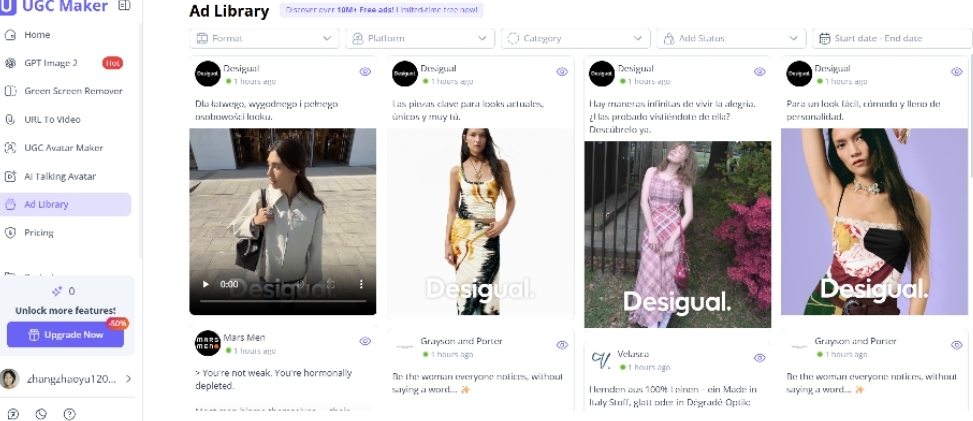
UGC Maker became part of my pre-spend research process because of one feature: the Ad Library. But once I was inside the platform, I found that the creative production side changed how I work just as significantly.
Why Ad Library Research Is a Non-Negotiable Pre-Spend Step
Let me explain the logic before getting into the tool specifics. When I’m about to allocate budget to a new campaign, especially on Meta or TikTok, I need to know:
- What creative formats are currently performing in this category
- What hooks and structures the top advertisers in the space are using
- What messaging angles are saturated versus underexplored
- What the visual language of successful ads in this niche looks like
Without this research, I’m guessing. And guessing with a media budget is expensive. Even if my targeting and bidding strategy are solid, if the creative is misaligned with what the market responds to, I’m burning money on a hypothesis I didn’t test.
(Do Ad Library Research with UGC Maker)
What UGC Maker’s Ad Library Actually Provides
1. Scale that matters for real research
The Ad Library inside UGC Maker indexes over 10M+ ads. That’s not a curated collection of examples, it’s a real dataset that reflects what’s actually running across platforms right now.
For competitive research, scale matters. A library of a few hundred examples tells you what looked good to a curator. A library of 10M+ tells you what the market is actually doing.
2. Creative pattern identification across niches
What I use the library for most is pattern matching. I’m not looking for a single great ad to copy, I’m looking for the recurring structures that signal a format is working broadly. Hook constructions that appear across multiple brands. Visual transitions that show up repeatedly in high-performing short-form content. CTA formats that seem to be trending.
These patterns are invisible if you’re looking at individual examples. They only emerge when you have enough data to compare across a large set. UGC Maker’s library is large enough to do this properly.
3. Informing creative briefs before production begins
The research output from the Ad Library goes directly into my creative brief. Before I generate a single video with UGC Maker’s avatar or URL to Video, I’ve already mapped the creative territory and identified which angles have empirical support.
This is what separates a data-informed creative strategy from generic content production. The library makes every creative decision defensible.
(Instantly Turn Landing Pages into Videos with UGC Maker)
How the Production Side Completes the Loop
Here’s what makes UGC Maker particularly effective for media buyers: the research and the production are in the same platform.
Once I’ve done my Ad Library analysis and built a creative brief, I can immediately move into production. Avatar-based videos for hook testing. URL-generated drafts for rapid iteration. The entire workflow from research to publish-ready asset happens inside one tool, which eliminates the translation friction of moving research insights into a separate production system.
This tight loop between research and production means I can complete a full pre-spend creative cycle, research, brief, produce, review, in a single working session rather than across multiple tools and multiple days.
The Practical Impact on Campaign Performance
- First-iteration creative success rate has increased, fewer total creative write-offs
- Time from campaign brief to first live test has decreased significantly
- Client conversations around creative strategy are more evidence-based
- I can identify competitive white space before spending, not after
What I Look for Specifically in an Ad Library Research Session
Because I get asked about this regularly, here’s exactly what a productive Ad Library research session looks like. I’m not browsing randomly — I’m running a structured audit before every new campaign. Four steps, every time:
- Step 1 — Category mapping: Search broadly to identify the most common formats, dominant hook styles, and repeating visual treatments. This gives me the creative landscape before I look at anything specific.
- Step 2 — Longevity filter: I focus on long-running ads. An ad that’s been live for three or four months isn’t still running because someone forgot to turn it off — it’s working. These are the highest-signal examples in the library.
- Step 3 — White space identification: What’s underrepresented in my category? Saturated angles cost more to compete on. Underutilized angles are often cheaper to test and can outperform because audiences haven’t been fatigued by them.
- Step 4 — Brief synthesis: I document findings into a one-page creative brief before I touch UGC Maker’s production tools. Research feeds directly into what I build.
The whole session takes 20–30 minutes. By the end, I have a clear picture of the landscape, a hypothesis grounded in market evidence, and a production plan ready to execute.
For Media Buyers Who Want Better Creative Intelligence
If you’re allocating media budgets without a structured creative research step, you’re operating with a significant information disadvantage. UGC Maker’s Ad Library is one of the most practical tools I’ve found for closing that gap.
Pair it with the production capabilities, URL to video, avatar generation, template variations, and you have an end-to-end creative intelligence and production system that genuinely changes how you operate.
Start with the free tier, run your first Ad Library research session before your next campaign launch, and see what you find that you would have otherwise missed.
For organizing your creative research notes and campaign documentation, UGC Maker(https://ugcmaker.io/) is a useful tool to keep alongside your media buying workflow.