
When I first encountered AI video generation tools, I felt the same mix of excitement and confusion most people do. Demo videos flooding the internet made it seem like typing a few sentences would instantly produce cinema-quality footage. But once I actually started using these tools, I discovered the path was far more winding—and far more interesting—than I’d expected.
This isn’t a product recommendation. It’s a field report. I want to share what it actually felt like to use Sora 2 AI Video tools for the first time, the mistakes I made along the way, and how I gradually built a workflow that made sense.
Who Actually Considers AI Video Tools?
From what I’ve observed, people trying AI video generation tend to fall into a few categories:
- Independent creators looking to produce shorts for YouTube or social media
- Small teams needing quick turnarounds on product demos or marketing materials
- Designers and photographers wanting to bring static work to life
- Curious experimenters who just want to see what AI can actually do
Regardless of which group you belong to, the initial mindset is usually similar: high expectations, minimal preparation.
Common Misconceptions When Starting Out
Misconception One: Simpler Prompts Work Better
When I first started using Sora 2, I kept my prompts short—things like “a cat running through grass.” The results were technically fine, but something always felt off. The footage lacked a certain quality I couldn’t quite name.
It took me a while to realize that AI needs more specific descriptions to understand the visual style, lighting mood, and camera movement you’re after. This isn’t because the tool lacks intelligence, it’s because “looking good” is an inherently vague concept.
Misconception Two: One Generation Gets You There
Many people, myself included, initially assumed AI video generation was a “one-click solution.” The reality is that most of the time, you need multiple rounds of prompt adjustments and parameter tweaks before landing on something close to your vision.
The process feels a bit like learning photography. You wouldn’t expect your first shutter click to produce a masterpiece.
Misconception Three: AI Replaces the Entire Workflow
Sora 2 AI can dramatically shorten certain stages of production, but it doesn’t make editing, audio work, or content planning disappear. More accurately, it reshuffles how you allocate time and effort.
My Learning Curve: From Chaos to Clarity
Phase One: Random Experimentation
For the first few weeks, I basically threw random prompts at the system to see what would happen. This phase was fun but wildly inefficient. Some outputs were stunning, others completely missed the mark, and I had no idea why.
Phase Two: Documenting and Comparing
The turning point came when I started logging my prompts alongside the results. Patterns slowly emerged:
- Describing specific actions worked better than describing abstract concepts
- Mentioning light direction and time of day (like “sidelight at dusk”) noticeably improved visual quality
- Style references (like “cinematic” or “documentary feel”) genuinely influenced the output
Phase Three: Building a Personal Workflow
After about two months, I developed a relatively stable routine:
- Test ideas with simple prompts to check feasibility
- Refine descriptions based on initial results
- Make minor post-production adjustments to satisfactory clips
- Document effective prompt templates for future use
This workflow isn’t complicated, but it took time to discover and validate.
Real-World Impressions of Different Models
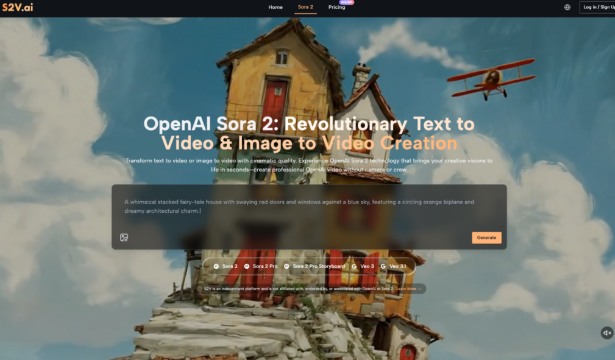
The S2V platform integrates multiple AI video models, including the Sora 2 series and Google’s Veo 3 series. In practice, I found each has distinct characteristics:
| Model Type | Best For | Personal Observations |
| Sora 2 Basic | Quick idea testing, social media clips | Faster generation, good for iteration |
| Sora 2 Pro | Commercial projects requiring higher quality | Better detail rendering, but demands more precise prompts |
| Pro Storyboard | Multi-scene narratives, connected stories | Scene-to-scene consistency is a standout feature |
| Veo 3 Series | Videos requiring native audio | Audio synchronization is a unique advantage |
The native audio generation in Veo 3 genuinely impressed me. In traditional workflows, sound effects and ambient audio require separate handling. This feature produces matching audio alongside the video, which cuts down on post-production work considerably.
Realistic Considerations About Time and Cost
How Time Investment Shifts
After adopting Sora 2 AI Video tools, my time allocation changed noticeably:
- Reduced: Basic footage capture, simple animation creation
- Increased: Prompt optimization, comparing multiple versions
- Roughly unchanged: Content planning, final editing, distribution
Overall, certain projects did wrap up faster. But not every type of content suits AI generation equally well.
The Learning Investment
This point often gets overlooked. While platforms like S2V don’t require video editing experience to get started, using these tools effectively still demands time spent understanding:
- The strengths and limitations of different models
- How to write prompts that actually work
- Which content types suit AI generation and which don’t
This learning process varies by person, but almost nobody skips it entirely.
Practical Advice for First-Time Users
Based on my own experience, here are a few suggestions that might help:
- Start with small projects. Don’t jump straight into complex multi-scene narratives. Test the waters with simple single-shot experiments first.
- Keep records of your attempts. Which prompts worked, which didn’t—this information saves enormous time later.
- Calibrate your expectations. AI video tools are powerful assistants, not magic wands. Accepting that “multiple attempts are normal” makes the whole process much more enjoyable.
- Pay attention to audio integration. If your project needs sound, Veo 3’s native audio feature is worth exploring. It eliminates a lot of sync headaches in post.
- Be patient with yourself. It took me roughly six to eight weeks before I felt like I actually knew what I was doing. That timeline is normal.
Closing Thoughts
Looking back on my journey learning Sora 2 AI video tools, the biggest takeaway wasn’t mastering any specific feature. It was developing a more grounded mindset: AI tools won’t make creation effortless, but they genuinely open up new possibilities.
For anyone considering giving this a try, my advice is simple: don’t be intimidated by the stunning demo videos, and don’t expect to replicate those results on day one. Give yourself room to experiment, make mistakes, and adjust. That process is part of the learning itself.
The S2V platform brings together models like Sora 2 and Veo 3 in one place, offering a relatively convenient starting point. But regardless of which tool you choose, the real value comes from the time and thought you invest—and that’s something AI can’t replace just yet.